How to Evaluate Commercial Security Systems Providers: Quick Guide
Picking the wrong commercial security systems provider is a mistake that is easy to make and hard to undo.
You could end up with outdated equipment, contracts that lock you in for years, or a vendor who stops returning calls once the installation is done. Price comparisons alone will not protect you from any of this.
This guide breaks down what actually matters when you evaluate a provider. Whether you are looking at IP video surveillance, access control, or AI-powered cameras, these are the questions to ask before you sign anything.
What Should You Look for When Evaluating a Commercial Security Provider?
A solid evaluation covers five areas: fit, technology, ownership, service, and support. Below is a breakdown of each one, along with the specific questions to ask every provider you consider.
1. Is Your Business the Right Fit for This Provider?
Every security company has a market they serve well. If your business falls outside that range, you will likely get slower response times and lower-priority service.
Some providers focus entirely on large enterprise accounts. Others specialize in residential installs and take commercial work on the side. Neither is a great fit for a business that needs consistent, responsive service over the long haul.
The goal is to find a provider who works with businesses like yours on a regular basis.
Questions to ask:
- What size businesses do you typically work with?
- Do you have current clients in my industry?
- Is my location within your primary service area?
- Will I be a priority, or will larger accounts take precedence?
Vulcan Security Systems is based in Birmingham and serves commercial clients throughout Alabama, from Huntsville to Dothan. We focus exclusively on commercial security. We do not serve the residential market, and that is intentional.
2. Do They Specialize in the Technology You Actually Need?
Security technology has changed a lot in the past decade. A provider with deep roots in older analog CCTV or residential alarm systems may not be the right fit for a modern IP video deployment.
When you talk to a provider, ask about their hands-on experience with:
- IP video surveillance: High-definition, networked cameras with remote access and system integration
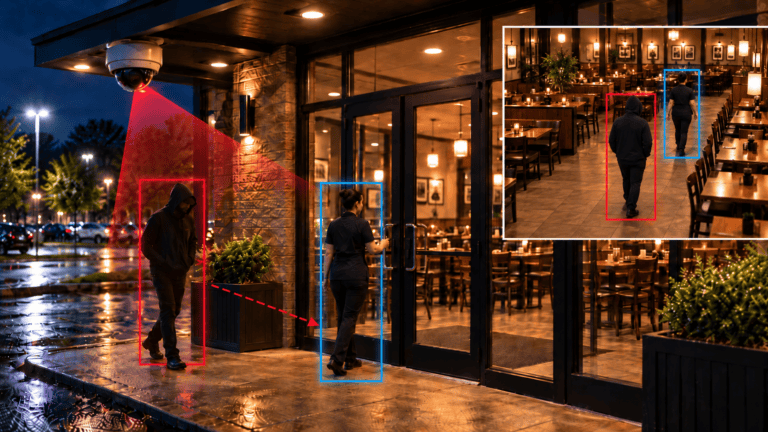
- AI-powered video analytics: Cameras that detect specific events in real time without requiring constant human monitoring
- Access control: Systems that log who enters and restrict access based on credentials
- Remote monitoring: The ability to view and manage your system from a phone or laptop
- Storage options: Cloud and local storage each have real tradeoffs in cost, control, and redundancy
A true specialist will design, configure, and support your system far better than a generalist who sells a little of everything.
3. Proprietary System or Open Architecture? Know Who Owns Your Equipment.
This is one of the most overlooked and costly mistakes businesses make. Some providers install proprietary systems that only they can service. If the relationship goes sideways, your options are very limited.
Here is what to watch for:
- Proprietary hardware: Equipment that only the installing vendor can configure, repair, or upgrade
- Lease-based contracts: Some agreements are structured as long-term leases, not purchases. Make sure you know which one you are signing.
- Limited upgrade paths: Proprietary systems often require a full replacement rather than incremental improvements
Open-architecture systems are built on standard IP networking protocols and widely available hardware. They let you work with multiple vendors, add equipment over time, and avoid being locked into one relationship indefinitely.
Before you sign anything, know exactly what you are buying and who will own it when the contract ends.
4. Can They Support a Networked System Securely?
Modern IP cameras connect to your network. That means they carry the same cybersecurity risks as any other connected device on your infrastructure.
A provider who cannot speak to network design and security configuration is a risk in itself. Ask these questions before committing:
- How do you protect cameras and recorders from unauthorized remote access?
- How are firmware updates managed and applied?
- Can your team resolve issues remotely, or does every service call require a truck roll?
- What is your typical response time for a remote support request?
On-site dispatch in the security industry usually runs between $200 and $300 per visit. A provider with solid remote support capability handles most problems faster and at a lower cost to you.
5. Do They Offer Proactive Service, or Just Reactive Repairs?
Any provider can fix things when they break. The best ones do not wait for something to break first.
Proactive camera maintenance means regular check-ins, system health monitoring, and keeping you informed as the technology changes. When you evaluate a provider, look for one who:
- Schedules regular system reviews rather than just responding to trouble calls
- Alerts you when cameras go offline or storage capacity gets low
- Recommends firmware updates before problems develop
- Returns calls quickly during the sales process (this is almost always a preview of post-sale service)
Ask for references from clients who have worked with the provider for three or more years. That is where the real story lives.
6. Are They Current on AI-Powered Surveillance?
The biggest shift in commercial security over the past few years is AI-powered video surveillance. Modern systems do not just record footage. They analyze what they see in real time and alert you when something specific happens.
Current AI capabilities worth asking about include:
- Object and person detection: Distinguishing between a person, a vehicle, and an animal to reduce false alarms
- License plate recognition: Automatically logging or flagging vehicles at entry points and parking areas
- Loitering and perimeter detection: Alerting your team when someone lingers in a restricted zone
- Behavioral analytics: Flagging unusual movement patterns before an incident escalates
Not every business needs all of these features. But your provider should understand them clearly and be able to deploy them if your needs grow.
What You Are Really Choosing Is a Long-Term Partner
Selecting a commercial security provider is not just a technology decision. It is a business relationship.
The company you hire will have access to your property, your network, and your recorded footage. They will be the ones you call when something goes wrong after hours. They will advise you on upgrades as your business changes. And they will either show up when you need support or they will not.
Evaluate them the way you would any key vendor: fit, capability, reliability, and track record. The providers who answer your questions clearly and quickly during the sales process are usually the same ones who deliver after the install.
If you are ready to start the conversation, or just want an expert set of eyes on what you currently have, we are here.
Frequently Asked Questions
What questions should I ask a commercial security company before hiring them?
Start with fit: What size businesses do they typically serve, and do they have clients in your industry? Then move to technology: What systems do they specialize in, and can they support AI-enabled cameras? Ask about ownership, and whether you are buying or leasing. Ask how they handle cybersecurity on networked systems. And ask for references from long-term clients. Pay attention to how quickly and clearly they answer. That alone tells you a lot.
What is the difference between proprietary and open-architecture security systems?
Proprietary systems use hardware and software that only the installing vendor can service. If you want to switch providers or add equipment from another manufacturer, you usually cannot. Open-architecture systems use standard IP networking protocols and widely available hardware. You have flexibility to work with multiple vendors, add cameras over time, and upgrade without starting from scratch.
How do AI-powered security cameras differ from standard IP cameras?
Standard IP cameras record high-definition footage, but someone has to review it to find what happened. AI-powered cameras analyze footage in real time. They detect specific objects, behaviors, or anomalies and send automated alerts. This reduces the labor burden of monitoring, speeds up response times, and makes it much easier to search footage after an incident.
Should I buy or lease my commercial security equipment?
Buying your equipment gives you more control, eliminates ongoing lease payments, and removes dependency on a single vendor. Leasing may lower your upfront cost, but it typically results in higher total cost over time and can create contractual lock-in. Make sure you understand the ownership structure before signing. Ask directly: “Do I own this equipment at the end of the contract?”
How do I know if a security provider is a good fit for my business?
Ask them directly: “What size businesses do you serve most often, and do you have references in my industry?” A provider who gives vague answers or redirects the question may not have the right experience. The best fit is a provider who considers your business size and industry their core market, not a side project.
Work With a Provider Who Knows Commercial Security
Vulcan Security Systems works with commercial clients throughout Alabama. We specialize in AI-powered IP video surveillance, access control, and remote monitoring for businesses and industrial facilities.
We offer a free on-site assessment for businesses that want an honest look at their current setup. No sales pressure. Just a clear picture of what you have, what you are missing, and what makes sense for your situation.